
Was ist der MCS-Audio-Button-Plugin?
Deutsch
Einzigartiges Screenreading für Ihre Website
Ist Ihnen bereits der neue Audiobutton für individuelles und persönliches Screenreading aufgefallen? Er ist eine echte Innovation, denn nach einer umfassenden Suche im Netz habe ich keine vergleichbare Lösung gefunden – also habe ich sie selbst entwickelt. Jetzt können Sie diese Funktion ganz einfach in Ihre eigene WordPress-Website integrieren.
Um den Button der mcs-audio-button-Erweiterung auf der Seite zu implementieren, erfolgt die Einbindung über den WordPress-Block-Editor.
Hier sind die konkreten Schritte zur Einbindung:
Block-Einfügung: Navigiere im WordPress-Editor zu der Stelle im Inhalt, an der der Audio-Button erscheinen soll. Klicke auf das „+“-Symbol (Block hinzufügen).
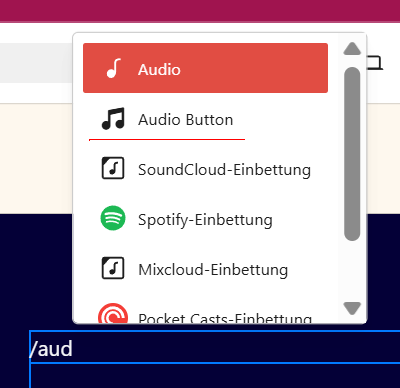
Suche: Gib im Suchfeld „Audio Button“ oder „MCS Audio Button“ ein und wähle den entsprechenden Block aus.
Konfiguration:
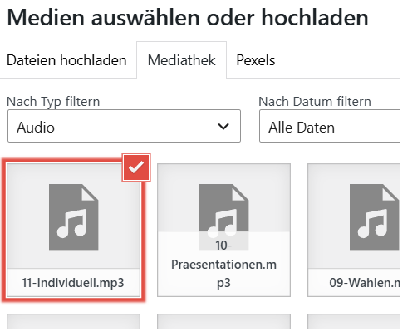
Nach dem Einfügen des Blocks öffnet sich in der rechten Seitenleiste das Einstellungsmenü für diesen Block. Dort kannst du die Quelldatei der Audiodatei hinterlegen und spezifische Parameter wie die Button-Beschriftung oder das Abspielverhalten konfigurieren.
Speichern: Nach der Konfiguration aktualisiere oder veröffentliche den Beitrag/die Seite, um den Button im Frontend der Website live zu schalten.
Sollte der Block nicht in der Auswahl erscheinen, ist sicherzustellen, dass das Plugin im Admin-Bereich unter „Plugins“ korrekt aktiviert wurde.
Kostenlos oder PRO?
Free-Version:
Ideal für den Einstieg. Sie können bis zu 3 Buttons pro Seite einsetzen.
PRO-Version:
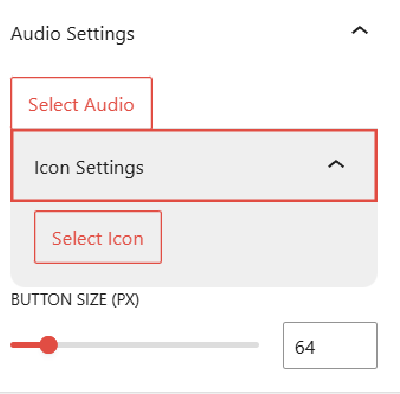
Für maximale Flexibilität. Passen Sie die Größe des Buttons an, wählen Sie ein individuelles Icon und nutzen Sie unbegrenzt viele Buttons pro Seite – ideal für den Aufbau Ihres eigenen Soundboards.
Probieren Sie es gleich aus und machen Sie Ihre Inhalte hörbar!
English
Unique Screenreading for your Website
Have you noticed the new audio button for individual and personal screenreading yet? It is truly one-of-a-kind. I searched the entire web for a function like this and couldn’t find anything comparable, so I built it myself. Now, you can easily integrate this feature into your own WordPress site.
To implement the MCS Audio Button extension on the page, the integration is performed via the WordPress Block Editor.
2. Here are the concrete steps for integration:
Block Insertion: Navigate to the location in the content within the WordPress editor where the audio button should appear. Click on the „+“ symbol (Add block).
Search: Enter „Audio Button“ or „MCS Audio Button“ in the search field and select the corresponding block.
Configuration:
After inserting the block, the settings menu for this block opens in the right sidebar. There, you can store the source file of the audio and configure specific parameters such as the button label or the playback behavior for the MCS Audio Button.
Saving: After configuration, update or publish the post/page to make the MCS Audio Button live on the website’s frontend.
If the MCS Audio Button block does not appear in the selection, ensure that the plugin has been correctly activated in the admin area under „Plugins“.
Free or PRO?
Free Version:
Perfect for getting started. You can use up to 3 buttons per page.
PRO Version:
For maximum flexibility. Customize the button size, choose from custom icons, and use an unlimited number of buttons per page – perfect for building your own personal soundboard.
Try it out now and make your content audible!
Der MCS-Audio-Button
Für mehr Personalisierung und eine freundlichere Barrierefreiheit, selbst eingesprochene Texte statt Screenreader
For greater personalization and friendlier accessibility, use self-recorded voice-overs instead of screen readers.